 AI Mentorship Hub

Ask ten people what an AI agent is and you will get ten answers. Most of them describe a chatbot with a nicer name. The difference is simple once you see it: a chatbot answers, an agent decides what to do next.
A chatbot answers. An agent decides.
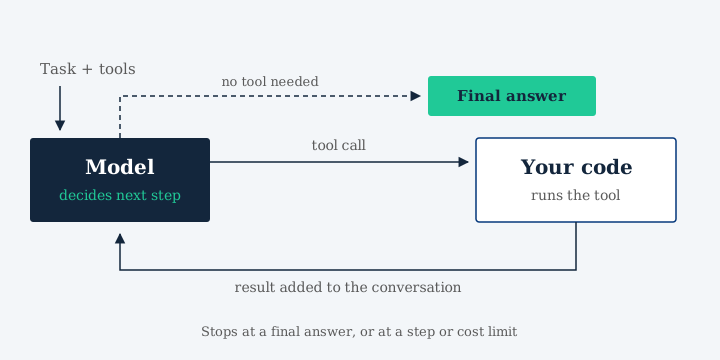
A chatbot takes your message, sends it to the model and shows you the reply. One call, one answer. An agent also calls the model, but the model's reply can be a request to use a tool: search the handbook, read a web page, check stock in a database. Your code runs that tool, sends the result back, and the model decides again.
That is the whole trick. The model does not run anything itself. It returns structured output that says which tool to call and with what arguments, and your code does the work.
The loop, in plain words
Send the task and the list of available tools to the model.
If the reply asks for a tool, run it and add the result to the conversation.
Send the longer conversation back and let the model decide again.
Stop when the model gives a final answer, or when you hit a limit.
What it looks like in code
Here is the same loop in Python, simplified. llm, user_msg and tools.run stand in for a few lines of setup each.
def agent(task, tools, steps=8): msgs = [user_msg(task)] for _ in range(steps): reply = llm(msgs, tools) msgs.append(reply) if not reply.tool_calls: return reply.content for call in reply.tool_calls: out = tools.run(call) msgs.append(out) return "Stopped: step limit"Stopping rules are not optional
An agent that decides its own next step can also decide to keep going. Every agent needs rules for when to stop: a maximum number of steps, a check for repeating the same action, and a cost budget. The steps=8 above is the simplest version.
When not to use an agent
When NOT to use an agent: the over-agentification trap; plain code is often better.
Module 6, Applied Agentic AI
If the steps are always the same, write them as a normal workflow. It is cheaper, faster and easier to test. Reach for an agent when the next step genuinely depends on what the last one found.
Where to go next
In Applied Agentic AI you build this loop from scratch in Module 6, then rebuild it in LangGraph in Module 7 and connect it to real tools over MCP in Module 8.